Menu
Your Cart

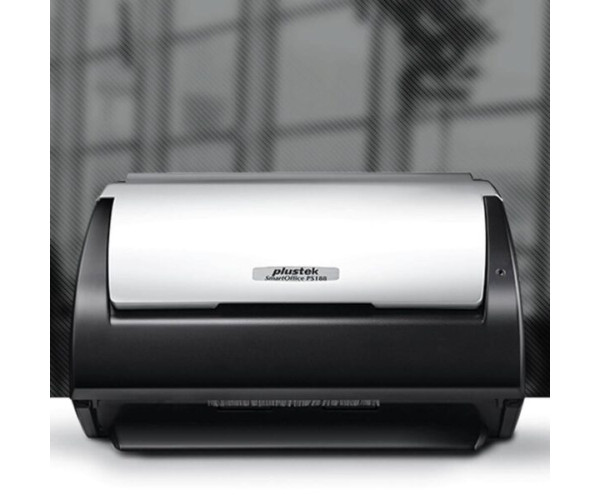
Plustek SmartOffice PS188 Scanner

Plustek SmartOffice PS188 Scanner
0৳
Ex Tax: 0৳
  • Stock: Out Of Stock
  • Brand: Plustek
  • Model: PS188
  • SKU: PS188
3070 views
It is requested to know about the stock and delivery of the product before ordering
Scanners Quick Info
Brand Plustek
Model PS188
Product Details
Image Sensor CIS x 2
Light Source LED
Hardware Resolution 600 x 600 dpi
Optical Resolution 600 dpi
Scan Modes Color Input 48-bit, Output 24-bit; Grayscale: Input 16-bit, Output 8-bit; Black & White: 1-bit
Scanning Speed 30 ppm/ 60 ipm (Grayscale mode, 200 & 300 dpi, A4 Portrait); 30 ppm/ 60 ipm (B&W mode, 200 & 300 dpi, A4 Portrait); 30 ppm/ 60 ipm (Color mode, 200 & 300 dpi, A4 Portrait); Note: Results may vary depending upon your scanning application, computer processor and system memory.
ADF Capacity 1. 50 sheets (A4/ Letter, 70 g/㎡ or 18 Lbs), Max. thickness under 5mm (0.2″); 2. 20 sheets (Business Cards); 3. Plastic Card, Max. thickness under 1.2 mm; Note: Maximum ADF capacity varies, depending upon paper weight.
Acceptable Paper Sizes (W x L) Max: 220 x 5080 mm (8.66” x 200”); Min: 63.5 x 50.8 mm (2.5” x 2”)
Daily Duty Scan ( Sheets ) 4,000
Roller Lifetime (Scans) 300,000
Pad Lifetime (Scans) 50,000
Action Button 3 Buttons: Up, Down, Scan; 9 Function Keys. All Customizable.
Power Supply 24 Vdc/ 0.75 A
Interface USB 2.0
Net Weight 1.66 Kgs (3.66 Lbs)
Dimensions (W x D x H) 263 x 128 x 148 mm (10.36″ x 5.02″ x 5.83″)
Protocol TWAIN Compliant
OS Windows 7 / 8 / 10 / 11; macOS 10.8.x/ 10.9.x/ 10.10.x/ 10.11.x/ 10.12.x/ 10.13.x/ 10.14.x/ 10.15.x/ 11.x/ 12.xLinux compatibility is only available for system integrators.
Hardware Requirements Windows and Mac; 2.0 GHz CPU processor or higher[1][2][3]; [1]Windows Recommended: 2.8 GHz Intel® Core™ i5 Processor with 4 CPU Cores or higher; [2]Support Mac INTEL and M1 based processor; [3]Compatibility is not available with PowerPC; 4 GB RAM minimum (Recommended: 8 GB or more); 6 GB of hard-disk space for program installation; Display dimensions of 1024×768 or greater
Bundled Software Plustek DocAction II; Plustek DocTWAIN; Plustek MacAction; Plustek ICA
Built-in OCR Plustek OCR (For Windows); (Powered by ABBYY® FineReader®)Plustek DocOCR (For Mac)

Plustek SmartOffice PS188 Scanner


Create a more efficient office with SmartOffice PS188

The SmartOffice PS188 has been designed to help office workgroups optimize their individual workflow. Using the new scanning management software; DocAction II and MacAction II, included with the PS188 allows for simple organization and management of scanned documents.

50-sheet ADF and high-speed scanning,

The PS188 is a 30/60 page-per-minute duplex scanner with a 50-sheet Automatic Document Feeder (ADF), making it highly efficient for scanning large batches of documents.

Scan and save documents into popular digital formats

The PS188 offers multiple types of saving format, including; PDF, TIFF, BMP, JPG, and PNG. It is convenient for multiple different users, for instance, accounting and sales departments, to deliver and edit multi format documents using the same scanner.

Optical Character Recognition (OCR)

Convert your scanned documents into text searchable and editable files, thus making the files easier to organize, search, and share.

Highly portable and fits in even an already crowded office yet offers wide versality in scanning tasks

The PS188 can handle multiple kinds of document format, such as; office documents, receipts, invoices, business cards, driving licences, insurance cards, and ID cards, all up to a thickness of 1.2mm

Barcode Scan

The PS188 gives the user a convenient way to scan barcodes included within documents. Users can then set scanned barcode numbers as the document filenames, allowing for easy retrieval of documents based on the user's own barcode systems.

Easy to use functionality

3 physical buttons and up to 9 customizable profiles stored on scanner.

The scan process is controlled by 3 physical buttons, but the user can create up to 23 profiles, stored on the PC or Mac and transferable over to the 9 profile slots of the SmartOffice PS188. These profiles can be customized based on aspects such as; scan mode in simplex or duplex, color or scale, resolution, format, and the save destination for the scanned documents.

Saving to FTP

The PS188 allows users to upload their scanned files to an FTP server, one of the most common methods of file storage and sharing. Saving the scanned document directly to FTP therefore allows the user to more easily share documents with colleagues, improving overall office workflow efficiency.

Write a review

Note: HTML is not translated!
Bad Good

What is the Plustek SmartOffice PS188 Scanner price in bd 2026?